6/4/2020

Assumption We Need

Statistical tests and confidence intervals for the regression coefficients of a linear regression model (typically) assume

\[\epsilon \sim N(0,\sigma^2I).\]

This is equivalent to \(\epsilon_1,\epsilon_2,…,\epsilon_n \sim N(0,\sigma^2)\) and i.i.d.

Unless discussing a permutation test or a bootstrap confidence interval, we will assume these assumptions are satisfied.
Two Facts

Fact 1

Show that if \(y = X\beta + \epsilon\) and \(\epsilon \sim N(0,\sigma^2I)\), then \[y\sim N(X\beta, \sigma^2I)\]

Fact 2

Show that if \(y = X\beta + \epsilon\) and \(\epsilon \sim N(0,\sigma^2I)\), then

\[\hat{\beta} = (X^TX)^{-1}X^Ty \sim N(\beta, \sigma^2(X^TX)^{-1}).\]

Compare Models

Hypothesis Tests to Compare Models

Motivation: How do we decide whether all or some of the regressor variables should be included in our model?

Consider a model, \(\Omega\), and a simpler model, \(\omega\), which consists of a subset of the regressors that are in \(\Omega\).

  • If the models have similar fit, we prefer model \(\omega\) since it is simpler.
  • If the two models have similar fit, then \(RSS_\omega-RSS_\Omega\) will be small.
  • If the fit of model \(\Omega\) is much better than model \(\omega\), then we prefer model \(\Omega\).
  • If \(RSS_\omega-RSS_\Omega\) is large, then model \(\Omega\) has a superior fit.

We need a null distribution related to \(RSS_\omega-RSS_\Omega\).

The Null Distribution

Suppose that model \(\Omega\) has \(p\) estimated regression coefficients and model \(\omega\) has \(q\) estimated regression coefficients.

The statistic \[\begin{aligned}F = & \frac{(RSS_\omega-RSS_\Omega)/(p-q)}{RSS_\Omega/(n-p)} \\ =& \frac{(RSS_\omega-RSS_\Omega)/(df_\omega - df_\Omega)}{RSS_\Omega/df_\Omega}\\ =& \frac{(RSS_\omega-RSS_\Omega)/(p-q)}{\hat{\sigma}^2_\Omega}\sim F_{p-q, n-p},\end{aligned} \]

assuming model \(\omega\) is correct, where:

  • \(df_\omega = n-q\)
  • \(df_\Omega = n-p\)
  • \(\hat{\sigma}^2_\Omega = RSS_\Omega/df_\Omega\)

General \(F\) Test

General F Test comparing two nested regression models

\(H_0\): Model \(\omega\) is adequate \(H_a\): Model \(\Omega\) is preferred

Test statistic: \[F = \frac{(RSS_\omega-RSS_\Omega)/(p-q)}{\hat{\sigma}^2_\Omega}\]

Decision: Conclude \(H_a\) when \(F\geq F_{p-q,n-p}^\alpha\).

p-value \(P(F_{p-q,n-p} \geq F)\)

Testing Example

Test of all regressors (test for a regression relationship)

Are any of the regressors useful in predicting the response?

  • Full model \((\Omega)\) is \(y=X\beta+\epsilon\)
  • \(X\) is a full-rank \(n×p\) matrix.
  • Reduced model \((\omega)\) is \(y=\mu+\epsilon=\beta_0+\epsilon\)

We can write the hypotheses as

\(H_0:\beta_1=\dots =\beta_{p-1}=0\) \(H_a\): At least one of the regression coefficients is different from zero.

Test Statistic

For the simple model \((\omega)\), we estimate \(\mu\) by \(\overline{y}\). Thus, \[RSS_\omega=(y- \overline{y} )^T (y-\overline{y})=TSS\], where TSS stands for the total sum of squares (corrected for the mean).

For the full model \((\Omega)\), we get our typical residuals sum of squares \[ RSS_\Omega=(y-X\hat{\beta} )^T (y-X\hat{\beta} )=\hat{\epsilon}^T \hat{\epsilon}=RSS.\]

Since the simple model has only 1 parameter and the full model was \(p\) parameters, the test statistic is

\[F=\frac{(TSS-RSS)/(p-1)}{RSS/(n-p)}=\frac{SS_{reg}/(p-1)}{\hat{\sigma}^2}.\]

ANOVA presentation

The information in the above test is often presented in an analysis of variance (ANOVA) table.

The ANOVA table looks something like:

Source Degrees of Freedom Sums of Squares Mean Squares F
Regression \(p-1\) \(SS_{reg}\) \(\frac{SS_{reg}}{p-1}\) \(F\)
Residual \(n-p\) RSS \(\frac{RSS}{n-p}\)
Total \(n-1\) TSS

Some Notes

  • Even if we fail to reject \(H_0\) (we’re not confident we should include any regressors), there may be a nonlinear relationship between the regressors and the response.
  • There may simply be too little data to confidently conclude a regressor helps describe the mean response.
  • Even if we conclude \(H_a\), we’re not sure that model \(\Omega\) is the best model—it is simply preferable to model \(\omega\).
  • Not all regressors may be necessary.
  • Additional regressors may improve the model further.
  • The F test for a regression relationship is just the beginning of analysis.

Galapagos Example

There are 30 cases (Islands) and seven variables in the data set. The relevant variables are:

  • Species – the number of plant species found on the island
  • Area – the area of the island (km2)
  • Elevation – the highest elevation of the island (m)
  • Nearest (the distance from the nearest island (km)
  • Scruz – the distance from Santa Cruz Island (km)
  • Adjacent – the area of the adjacent island (km2)

Galapagos Example (Test)

Test whether there is a regression relationship between the response and all the predictors.

\(H_0:\)

\(H_a:\)

Galapagos Example (Test)

Test whether there is a regression relationship between the response and all the predictors.

\(H_0:\ \beta_{Area} = \beta_{Elevation}=\beta_{Nearest} = \beta_{Scruz} =\beta_{Adjacent}=0\)

\(H_a:\) At least for one predictor \(\beta_{pred}\neq 0\).

Test statistic:

p-value:

Galapagos Example (Test)

data(gala, package = 'faraway')
lmod = lm(Species ~ . - Endemics, data = gala)
summary(lmod)
## 
## Call:
## lm(formula = Species ~ . - Endemics, data = gala)
## 
## Residuals:
##      Min       1Q   Median       3Q      Max 
## -111.679  -34.898   -7.862   33.460  182.584 
## 
## Coefficients:
##              Estimate Std. Error t value Pr(>|t|)    
## (Intercept)  7.068221  19.154198   0.369 0.715351    
## Area        -0.023938   0.022422  -1.068 0.296318    
## Elevation    0.319465   0.053663   5.953 3.82e-06 ***
## Nearest      0.009144   1.054136   0.009 0.993151    
## Scruz       -0.240524   0.215402  -1.117 0.275208    
## Adjacent    -0.074805   0.017700  -4.226 0.000297 ***
## ---
## Signif. codes:  0 '***' 0.001 '**' 0.01 '*' 0.05 '.' 0.1 ' ' 1
## 
## Residual standard error: 60.98 on 24 degrees of freedom
## Multiple R-squared:  0.7658, Adjusted R-squared:  0.7171 
## F-statistic:  15.7 on 5 and 24 DF,  p-value: 6.838e-07

Galapagos Example (Test)

Test whether there is a regression relationship between the response and all the predictors.

\(H_0:\ \beta_{Area} = \beta_{Elevation}=\beta_{Nearest} = \beta_{Scruz} =\beta_{Adjacent}=0\)

\(H_a:\) At least for one predictor \(\beta_{pred}\neq 0\).

Test statistic: 15.6994122, 5, 24

p-value : 6.837893^{-7}

Test and p-value can be extracted as summary(lmod)$fstatistic and 1-pf(summary(lmod)$fstatistic, summary(lmod)$df[1] -1, summary(lmod)$df[2])[1]

Testing just One Regressor

Test

To test whether a single regressor (regressor \(i\)) can be dropped from the model, we choose between \(H_0:\beta_i=0\) and \(H_a:\beta_i\neq 0\).

We have two options in this case:

  • Use the previous approach, letting the reduced model be the one without that regressor.
  • Use a t-statistic approach.

The statistic \(t_i=\hat{\beta}_i/\hat{se}(\hat{\beta}_i)\) has a t distribution with \(n-p\) degrees of freedom under \(H_0\) and can be used to decide between the claims using a t distribution with \(n-p\) degrees of freedom.

Some Notes

  • \(t_i^2=F\) and the results will be numerically identical.
  • The t distribution approach requires less work, and is typically preferred in this simpler context.
  • The test of a regression coefficient is relative to the other regressors in the model. We cannot look at the effect of one regressor without considering the effect of the other regressors.
  • The result of a test may be different when different regressor variables are considered.

Galapagos Example

Test whether the regression coefficient for Area is significant (assuming the other predictors are in the model).

\(H_0:\)

\(H_a:\)

Galapagos Example

Test whether the regression coefficient for Area is significant (assuming the other predictors are in the model).

\(H_0:\ \beta_{Area}=0\)

\(H_a:\ \beta_{Area}\neq 0\)

Test statistic:

p-value:

Conclusion in contex:

Galapagos Example

summary(lmod)
## 
## Call:
## lm(formula = Species ~ . - Endemics, data = gala)
## 
## Residuals:
##      Min       1Q   Median       3Q      Max 
## -111.679  -34.898   -7.862   33.460  182.584 
## 
## Coefficients:
##              Estimate Std. Error t value Pr(>|t|)    
## (Intercept)  7.068221  19.154198   0.369 0.715351    
## Area        -0.023938   0.022422  -1.068 0.296318    
## Elevation    0.319465   0.053663   5.953 3.82e-06 ***
## Nearest      0.009144   1.054136   0.009 0.993151    
## Scruz       -0.240524   0.215402  -1.117 0.275208    
## Adjacent    -0.074805   0.017700  -4.226 0.000297 ***
## ---
## Signif. codes:  0 '***' 0.001 '**' 0.01 '*' 0.05 '.' 0.1 ' ' 1
## 
## Residual standard error: 60.98 on 24 degrees of freedom
## Multiple R-squared:  0.7658, Adjusted R-squared:  0.7171 
## F-statistic:  15.7 on 5 and 24 DF,  p-value: 6.838e-07

Galapagos Example

Test whether the regression coefficient for Area is significant (assuming the other predictors are in the model).

\(H_0:\ \beta_{Area}=0\)

\(H_a:\ \beta_{Area}\neq 0\)

Test statistic: -0.0239383

p-value: 0.296318

Galapagos Example

Test whether the regression coefficient for Area is significant (assuming the other predictors are in the model).

\(H_0:\ \beta_{Area}=0\)

\(H_a:\ \beta_{Area}\neq 0\)

Test statistic: -0.0239383

p-value: 0.296318

Conclusion in contex: We don’t have enough evidence to claim that area of an island is associated with number of species after controlling for Elevation, Nearest, Scruz, and Adjacent.

Caution

It is not sufficient to say you are testing whether the coefficient for a single regressor is significant when other regressors are in the model.

You should specify which regressor variables are in the model.

Only Area

How do the results change if the larger model only had the Area regressor?

lmod_area = lm(Species ~ Area, data = gala)
summary(lmod_area)
## 
## Call:
## lm(formula = Species ~ Area, data = gala)
## 
## Residuals:
##     Min      1Q  Median      3Q     Max 
## -99.495 -53.431 -29.045   3.423 306.137 
## 
## Coefficients:
##             Estimate Std. Error t value Pr(>|t|)    
## (Intercept) 63.78286   17.52442   3.640 0.001094 ** 
## Area         0.08196    0.01971   4.158 0.000275 ***
## ---
## Signif. codes:  0 '***' 0.001 '**' 0.01 '*' 0.05 '.' 0.1 ' ' 1
## 
## Residual standard error: 91.73 on 28 degrees of freedom
## Multiple R-squared:  0.3817, Adjusted R-squared:  0.3596 
## F-statistic: 17.29 on 1 and 28 DF,  p-value: 0.0002748

Only Area: Hypothesis Test

\(H_0:\)

\(H_a:\)

Test statistic:

p-value

Conclusion:

Only Area: Hypothesis Test

\(H_0:\ \beta_{Area} = 0\)

\(H_a:\ \beta_{Area}\neq 0\)

Test statistic: 0.0819632

p-value: 2.748268^{-4}

Conclusion: Area is significantly (p-value: 2.748268^{-4}) associated with number of species in an island.

Testing a pair of regressors

Procedure

To test whether two (or more) regressors should simultaneously be dropped from the model, we should fit a reduced model without them and a full model including them using the general F test procedure previously described.

Galapagos example continued: Test whether the Area and Adjacent regressor variables should be simultaneously dropped from the model that already includes Elevation, Nearest, and Scruz in the model. Make sure to specify the regressors that are the model when stating H_0 and H_a.

Galapagos Example

reduced_model = lm(Species ~ Elevation + Nearest + Scruz, data = gala)
summary(reduced_model)
## 
## Call:
## lm(formula = Species ~ Elevation + Nearest + Scruz, data = gala)
## 
## Residuals:
##     Min      1Q  Median      3Q     Max 
## -194.53  -31.31  -18.41   12.84  246.65 
## 
## Coefficients:
##             Estimate Std. Error t value Pr(>|t|)    
## (Intercept) 23.66993   22.96231   1.031    0.312    
## Elevation    0.20019    0.03437   5.824 3.88e-06 ***
## Nearest      1.19422    1.28777   0.927    0.362    
## Scruz       -0.42342    0.27022  -1.567    0.129    
## ---
## Signif. codes:  0 '***' 0.001 '**' 0.01 '*' 0.05 '.' 0.1 ' ' 1
## 
## Residual standard error: 78.03 on 26 degrees of freedom
## Multiple R-squared:  0.5846, Adjusted R-squared:  0.5367 
## F-statistic:  12.2 on 3 and 26 DF,  p-value: 3.593e-05

Galapagos Example

sum(resid(lmod)^2) # RSS_Full
## [1] 89231.37
deviance(lmod) # RSS_full (different way to extract)
## [1] 89231.37
deviance(reduced_model) # RSS_reduced
## [1] 158291.6
(numerator =  (deviance(reduced_model) - deviance(lmod))/(reduced_model$df.residual - lmod$df.residual))
## [1] 34530.13
(denominator = deviance(lmod)/lmod$df.residual)
## [1] 3717.974
(F = numerator/denominator)
## [1] 9.287352
(p_value = 1-pf(F, reduced_model$df.residual - lmod$df.residual, lmod$df.residual))
## [1] 0.001029711

Galapagos Example

anova(lmod, reduced_model)
## Analysis of Variance Table
## 
## Model 1: Species ~ (Endemics + Area + Elevation + Nearest + Scruz + Adjacent) - 
##     Endemics
## Model 2: Species ~ Elevation + Nearest + Scruz
##   Res.Df    RSS Df Sum of Sq      F  Pr(>F)   
## 1     24  89231                               
## 2     26 158292 -2    -69060 9.2874 0.00103 **
## ---
## Signif. codes:  0 '***' 0.001 '**' 0.01 '*' 0.05 '.' 0.1 ' ' 1

F test for Area only

anova(lmod,lm(Species ~.-Endemics - Area, data = gala))
## Analysis of Variance Table
## 
## Model 1: Species ~ (Endemics + Area + Elevation + Nearest + Scruz + Adjacent) - 
##     Endemics
## Model 2: Species ~ (Endemics + Area + Elevation + Nearest + Scruz + Adjacent) - 
##     Endemics - Area
##   Res.Df   RSS Df Sum of Sq      F Pr(>F)
## 1     24 89231                           
## 2     25 93469 -1   -4237.7 1.1398 0.2963

Do you see, \(t_i^2 = F\)?

F test for Adjacent Only

anova(lmod,lm(Species ~.-Endemics - Adjacent, data = gala))
## Analysis of Variance Table
## 
## Model 1: Species ~ (Endemics + Area + Elevation + Nearest + Scruz + Adjacent) - 
##     Endemics
## Model 2: Species ~ (Endemics + Area + Elevation + Nearest + Scruz + Adjacent) - 
##     Endemics - Adjacent
##   Res.Df    RSS Df Sum of Sq      F    Pr(>F)    
## 1     24  89231                                  
## 2     25 155638 -1    -66406 17.861 0.0002971 ***
## ---
## Signif. codes:  0 '***' 0.001 '**' 0.01 '*' 0.05 '.' 0.1 ' ' 1

Permutation Test

Assumptions for Tests

The tests we have considered thus far assume that

\[\epsilon_i\sim N(0,\sigma^2),\ i=1,2,\dots, n.\quad i.i.d \]

The Central Limit Theorem applies to the estimated regression coefficients, so inference based on the assumption of normality can be approximately correct provided the sample size is large enough.

Permutation tests do not require an assumption of normal errors. Instead, the errors are typically assumed to be independent and identically distributed, or more generally, the errors should be exchangeable.

Motivating idea behind permutation tests

If the response has no relationship with the regressor variables, then we should be able to randomly permute the response variable without a substantial difference in the typical model results. (None of the regressors matter anyway, right?)

See in Figure

original = data.frame(x = rnorm(100), y = rnorm(100), tag = rep('original y',100))
dat = original
for(i in 1:3){
  flag = data.frame(x = original$x, y = sample(original$y), 
                    tag = rep(paste0('permuted y ',i), 100))
  dat = rbind(dat, flag) 
}

See in Figure

library(ggplot2)
ggplot(data = dat, aes(x = x, y = y))+
  geom_point()+
  facet_wrap(vars(tag))

Formal Permutation Test

  • Permute the response variable for all possible (\(n!\)) permutations
  • Fit the regression model to each permuted data set
  • Calculate the \(F\) statistic associated with the general \(F\) test for each model.
  • The p-value is the proportion of test statistics for the permuted data that are as extreme (i.e., at least as large as) the test statistic for the original data set.
  • The p-value of the permutation test can often be approximated by the p-value from the general F test.

Advantages and Disadvantages

Advantages of the permutation test:

  • Doesn’t require normal errors.
  • More robust than other traditional methods if the errors are not normal.

Disadvantages of the permutation test:

  • Takes more time.
  • The test is not as powerful when the errors are truly normal.

To speed up computation time for the permutation test, we use only a subset of random permutations instead of all possible permutations.

A permutation of a vector can be obtained in R using the sample function.

Galapagos Example (Permutation Test)

Use a permutation test to assess whether the variables Nearest and Scruz should be used as regressors for Species.

lmod <- lm(Species ~ Nearest + Scruz, data = gala)
lms <- summary(lmod)
print(lms)
## 
## Call:
## lm(formula = Species ~ Nearest + Scruz, data = gala)
## 
## Residuals:
##    Min     1Q Median     3Q    Max 
## -97.88 -73.54 -46.30  18.34 344.82 
## 
## Coefficients:
##             Estimate Std. Error t value Pr(>|t|)   
## (Intercept)  98.4765    28.3561   3.473  0.00175 **
## Nearest       1.1792     1.9184   0.615  0.54391   
## Scruz        -0.4406     0.4025  -1.095  0.28333   
## ---
## Signif. codes:  0 '***' 0.001 '**' 0.01 '*' 0.05 '.' 0.1 ' ' 1
## 
## Residual standard error: 116.2 on 27 degrees of freedom
## Multiple R-squared:  0.04269,    Adjusted R-squared:  -0.02823 
## F-statistic: 0.602 on 2 and 27 DF,  p-value: 0.5549

f statistic and p-value

Test statistic available from summary function

fobs <- lms$fstatistic[1]
1 - pf(lms$fstatistic[1], lms$fstatistic[2], lms$fstatistic[3])
##     value 
## 0.5549255

Randomly sample responses (4000 times), recompute model and fstatistic

nreps <- 4000
set.seed(123) # reproducible results
fstats <- numeric(nreps) # to store permuted test statistics
for (i in 1:nreps) {
  lmodp <- lm(sample(Species) ~ Nearest + Scruz, gala) # permute response
  # and then regress permuted response on Nearest and Scruz
  lmodps <- summary(lmodp) # summarize fit from lmodp
  # extract the fstatistic from the summary of lmodp
  fstats[i] <- lmodps$fstatistic[1]
}

compute p-value

Note: p-value = the proportion of simulated test statistics at least as extreme as our observed test statistics).

mean(fstats >= fobs)
## [1] 0.55825

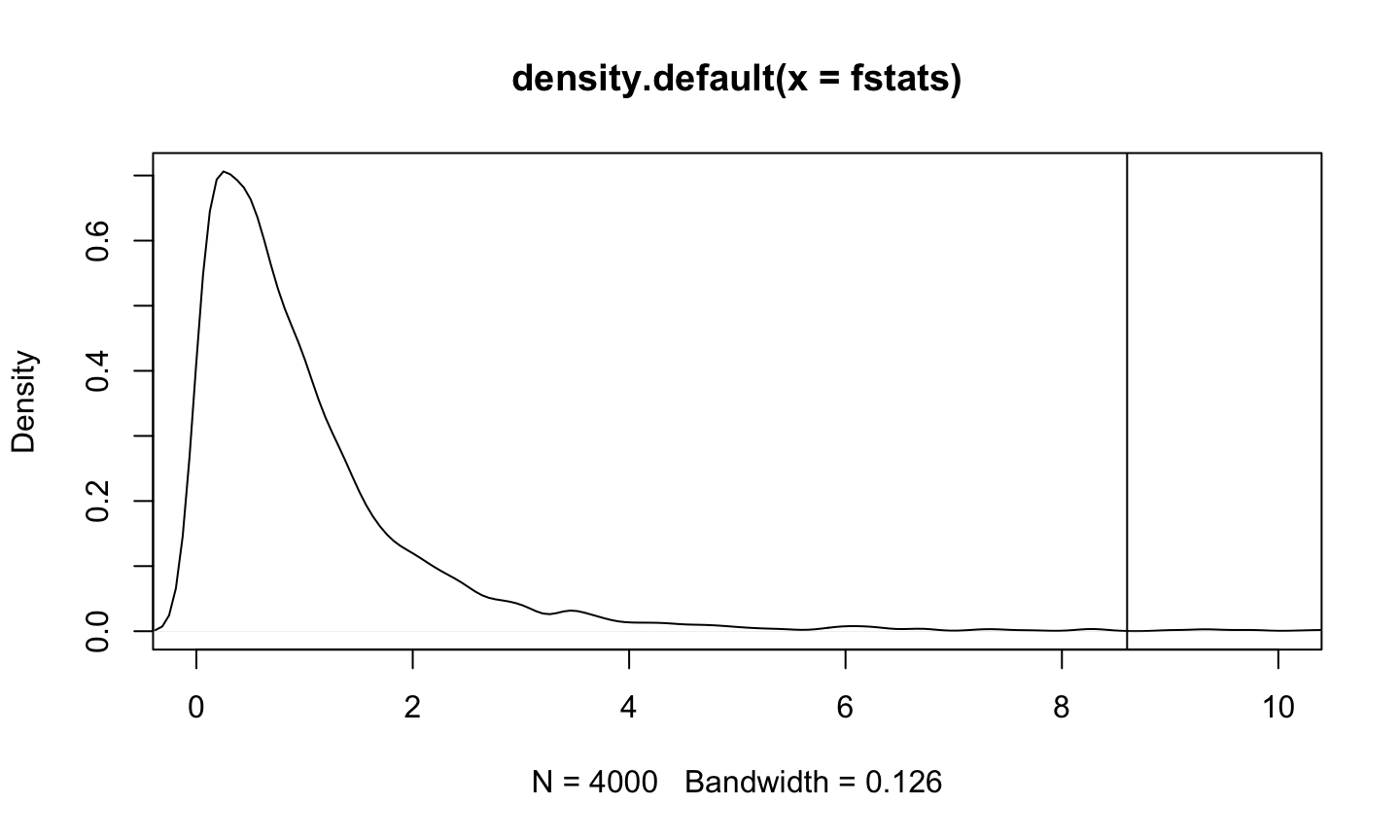
compare statistics for permuted data to observed statistic

plot(density(fstats), xlim = c(0, 10))
abline(v = fobs)

Use a permutation test to assess whether the variables Area and Adjacent should be used as regressors for Species.

lmod <- lm(Species ~ Area + Adjacent, data = gala)
lms <- summary(lmod)
print(lms)
## 
## Call:
## lm(formula = Species ~ Area + Adjacent, data = gala)
## 
## Residuals:
##     Min      1Q  Median      3Q     Max 
## -104.40  -53.94  -27.47   21.87  301.75 
## 
## Coefficients:
##             Estimate Std. Error t value Pr(>|t|)    
## (Intercept) 66.27714   18.26047   3.630 0.001169 ** 
## Area         0.08406    0.02028   4.144 0.000302 ***
## Adjacent    -0.01166    0.02027  -0.575 0.570059    
## ---
## Signif. codes:  0 '***' 0.001 '**' 0.01 '*' 0.05 '.' 0.1 ' ' 1
## 
## Residual standard error: 92.85 on 27 degrees of freedom
## Multiple R-squared:  0.3892, Adjusted R-squared:  0.344 
## F-statistic: 8.602 on 2 and 27 DF,  p-value: 0.001287

f statistic and p-value

Test statistic available from summary function

fobs <- lms$fstatistic[1]
1 - pf(lms$fstatistic[1], lms$fstatistic[2], lms$fstatistic[3])
##       value 
## 0.001286913

Randomly sample responses (4000 times), recompute model and fstatistic

nreps <- 4000
set.seed(123) # reproducible results
fstats <- numeric(nreps) # to store permuted test statistics
for (i in 1:nreps) {
  lmodp <- lm(sample(Species) ~ Nearest + Scruz, gala) # permute response
  # and then regress permuted response on Nearest and Scruz
  lmodps <- summary(lmodp) # summarize fit from lmodp
  # extract the fstatistic from the summary of lmodp
  fstats[i] <- lmodps$fstatistic[1]
}

compute p-value

Note: p-value = the proportion of simulated test statistics at least as extreme as our observed test statistics).

mean(fstats >= fobs)
## [1] 0.00625

compare statistics for permuted data to observed statistic

plot(density(fstats), xlim = c(0, 10))
abline(v = fobs)

Permutation of a Regressor

Testing whether a regressor can be dropped from the regression model also falls within the permutation test framework.

For a test involving a single regression coefficient \(\beta_j\), we permute regressor \(X_j\) instead of the response.

  • If \(X_j\) has no relationship with the response, permuting \(X_j\) should have little impact on the model fit.

Galapagos Example

Test whether the Scruz regressor should be in the model when Nearest is in the model.

tobs <- lms$coef[3,3]
# Randomly sample Scruz (4000 times), recompute model and tstatistic
nreps <- 4000
tsim <- numeric(nreps)
set.seed(123) # reproducability
for (i in 1:nreps) {
  # fit model with permuted Scruz
  lmodp = lm(Species ~ Nearest + sample(Scruz), gala)
  lmodps = summary(lmodp) # summarize results
  # extract the t statistic for the permuted data
  tsim[i] <- lmodps$coef[3,3]
}

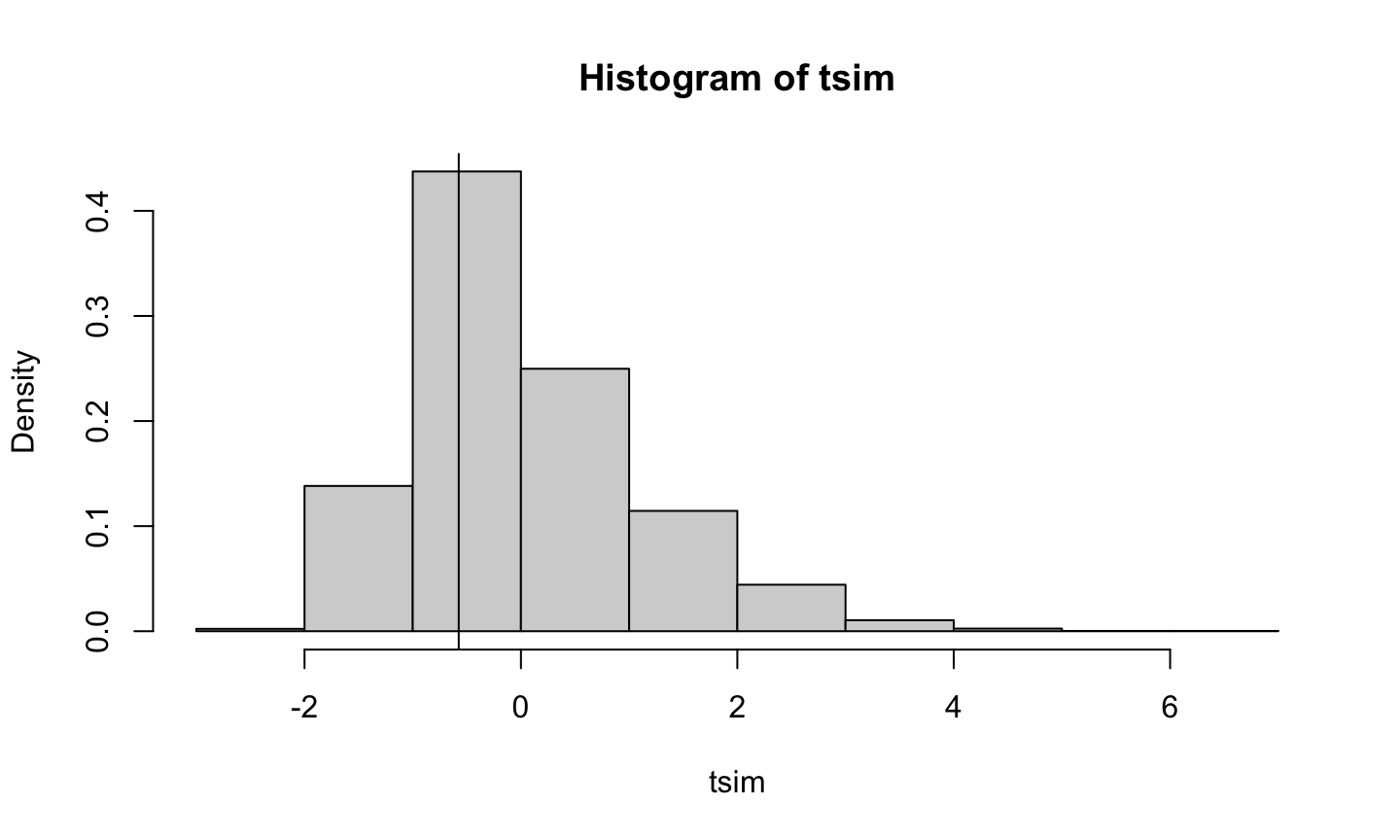
visual comparison of test statistics from permuted data to observed data

hist(tsim, freq = FALSE)
abline(v = tobs)

compute p-value

mean(abs(tsim) >= abs(tobs))
## [1] 0.58075

Confidence Interval for \(\beta\)

What

An alternative way of expressing the uncertainty in our estimates is through confidence intervals (CIs) or confidence regions.

  • A confidence region is the same thing as a CI, except that it may have more than one dimension.

A confidence region provides us with plausible values of our target parameter(s).

When constructing confidence regions for more than one parameter, we must decide whether to form the confidence regions individually or simultaneously.

Link to Hypothesis Test

Link to Hypothesis Test

Confidence Interval

The CIs for the individual regression coefficients take the form

\[\hat{\beta}_{i-1}\pm t_{n-p}^{\alpha/2} \hat{\sigma}\sqrt{(X^TX)_{ii}^{-1}},\quad i=1,\dots, p\] which is the same as \[\hat{\beta}_{i-1} \pm t_{n-p}^{\alpha/2} \hat{se}\left(\hat{\beta}_{i-1}\right) i= 1, \dots, p.\]

Confidence Region

A 100(1-\(\alpha\))% simultaneous (joint) confidence region for \(\beta\) satisfies:

\[(\hat{\beta}-\beta)^TX^TX(\hat{\beta} - \beta) \leq p\hat{\sigma}^2 F_{p,n-p}^\alpha.\]

These regions produce ellipsoids in p-space, so they cannot be easily visualized except in two dimensions.

These regions can be easily plotted using the confidenceEllipse function in the car package.

Galapagos Example

Construct a 95% CI for \(\beta_{Area}\) (assuming the other four predictors are in the model).

lmod = lm(Species ~ Area + Elevation + Nearest + Scruz + Adjacent, data = gala)
summary(lmod)
## 
## Call:
## lm(formula = Species ~ Area + Elevation + Nearest + Scruz + Adjacent, 
##     data = gala)
## 
## Residuals:
##      Min       1Q   Median       3Q      Max 
## -111.679  -34.898   -7.862   33.460  182.584 
## 
## Coefficients:
##              Estimate Std. Error t value Pr(>|t|)    
## (Intercept)  7.068221  19.154198   0.369 0.715351    
## Area        -0.023938   0.022422  -1.068 0.296318    
## Elevation    0.319465   0.053663   5.953 3.82e-06 ***
## Nearest      0.009144   1.054136   0.009 0.993151    
## Scruz       -0.240524   0.215402  -1.117 0.275208    
## Adjacent    -0.074805   0.017700  -4.226 0.000297 ***
## ---
## Signif. codes:  0 '***' 0.001 '**' 0.01 '*' 0.05 '.' 0.1 ' ' 1
## 
## Residual standard error: 60.98 on 24 degrees of freedom
## Multiple R-squared:  0.7658, Adjusted R-squared:  0.7171 
## F-statistic:  15.7 on 5 and 24 DF,  p-value: 6.838e-07

Galapagos Example

Construct a 95% CI for \(\beta_{Area}\) (assuming the other four predictors are in the model).

qt(.975, df = df.residual(lmod))
## [1] 2.063899
-.02394 + c(-1, 1) * 2.0639 * .02242
## [1] -0.07021264  0.02233264

construct 95% confidence intervals of all parameters

confint(lmod, level = 0.95)
##                   2.5 %      97.5 %
## (Intercept) -32.4641006 46.60054205
## Area         -0.0702158  0.02233912
## Elevation     0.2087102  0.43021935
## Nearest      -2.1664857  2.18477363
## Scruz        -0.6850926  0.20404416
## Adjacent     -0.1113362 -0.03827344

Note: the intervals were produced at the same time, but these are not simultaneous confidence regions.

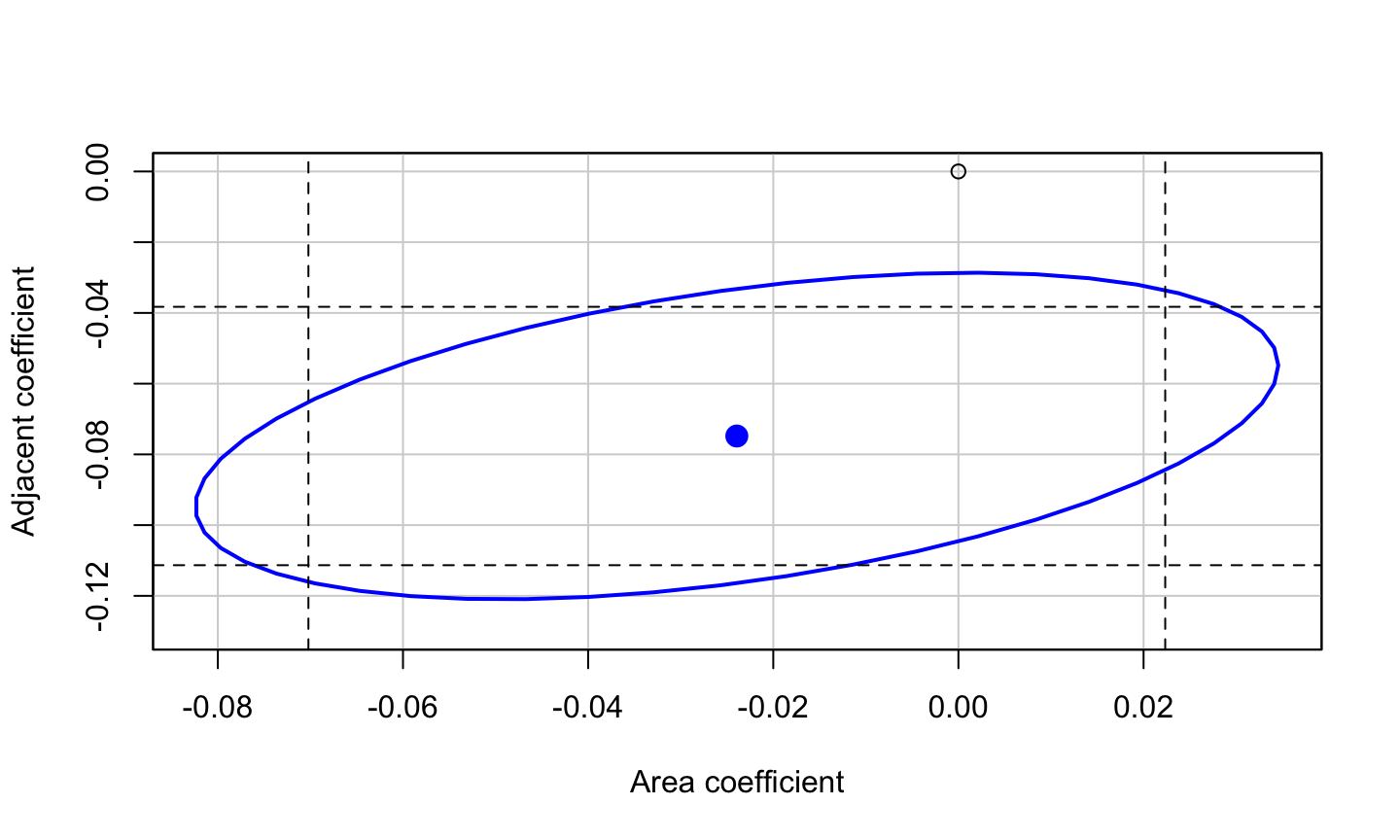
Construct a 95% joint confidence region for \(\beta_{Area}\) and \(\beta_{Adjacent}\)

confidenceEllipse(lmod, which.coef = c(2, 6), ylim = c(-0.13, 0))
points(0,0)
abline(v = confint(lmod)[2,], lty = 2)
abline(h = confint(lmod)[6,], lty = 2)

Some Notes

  • Both the horizontal width and vertical width of the joint confidence region is wider than the widths of the individual confidence intervals.

  • The overall area of the joint region is smaller than the area of the intersection between the two individual confidence regions.

  • This is because the estimated regression parameters are positively correlated.

  • If the lines of the individual confidence regions were tangential to the joint region, then the individual CIs would by jointly correct (their confidence level would be at least 95%). Why?

Questions?

  • Is it plausible that \(\beta_{Area}=\beta_{Adjacent}=0\)? Why?

.

.

  • Is it plausible that \(\beta_{Area}=-0.06\) and \(\beta_{Adjacent}=-0.045\)? Why? Do the results change if you use the individual confidence regions instead of the joint regions?

Caution

It is possible to make different conclusions when using individual confidence regions in comparison with the joint confidence regions!

The joint confidence regions should be preferred.

We must be cautious about how we interpret univariate hypothesis tests or confidence intervals because the same conclusions may not be jointly true!

Bootstrap Confidence Interval

When and why we need them?

The F- and t-based confidence regions and intervals we have described depend on the assumption of normal errors, specifically, that \(\epsilon_i \sim N(0,\sigma^2)\), i.i.d.

  • In general, parametric CIs assume we know the sampling distribution of the statistic that estimates our target parameter.

How would we approximate the sampling distribution of a statistic using simulated data if we knew the distribution of the population?

Estimating the sampling distribution of \(\hat{\beta}\) using simulation:

  • Generate \(\epsilon\) from a known distribution.
  • Form \(y=X\beta+\epsilon\) for fixed \(X\) and \(\beta\).
  • Compute \(\hat{\beta}\).
  • Repeat steps 1-3 many times
  • Estimate the sampling distribution of the estimated coefficients with the empirical distribution of the estimated coefficients from the simulated data sets.

Determining the bootstrap distribution of \(\hat{\beta}\)

We can use the bootstrap method to produce a confidence interval for our regression coefficients when error distribution is unknown or non-normal. Process:

  • Generate \(\epsilon^*\) by sampling with replacement from \(\hat{\epsilon}\).
  • Form \(y^*=X\hat{\beta}+\epsilon^*\) for fixed \(X\) and using the \(\hat{\beta}\) from the fitted model of the original data.
  • Compute \(\hat{\beta}^*\) from \((X,y^*)\).
  • Repeat steps 1-3 many times
  • Estimate the sampling distribution of the estimated coefficients using the bootstrap distribution of the estimated coefficients from the bootstrapped data sets.

Bootstrap CI

A bootstrap CI for a parameter is constructed by taking the appropriate quantiles of the bootstrap distribution for the statistic that estimates the parameter.

It is possible to take every possible bootstrap sample from \(\hat{\epsilon}\), but we usually just take a lot of samples.

  • We sample the residuals using the sample function with the argument replace=TRUE.
  • The residuals and fitted functions get the residuals and fitted values, respectively from the original fitted model.

Galapagos Example

lmod = lm(Species ~ Area + Elevation + Nearest + Scruz + Adjacent, data = gala)
set.seed(123)
nb = 4000 # number of bootstrap samples
coefmat = matrix(0, nb, 6)
resids = residuals(lmod) #extract residuals
preds = fitted(lmod) # fitted values
for (i in 1:nb) {
  booty <- preds + sample(resids, replace = TRUE) # create bootstrap data
  # fit regression model to bootstrap data
  bmod <- lm(booty ~ Area + Elevation + Nearest + Scruz + Adjacent, data = gala)
  coefmat[i,] = coef(bmod) # extract estimated coefficients from bmod and store them for later
}

Construct Bootstrap CI

colnames(coefmat) = c("Intercept", colnames(gala[,3:7])) # rename columns of coefmat
coefmat <- data.frame(coefmat) # convert to data frame
cis = apply(coefmat, 2, quantile, probs = c(.025, .975)) # construct 95% CIs for each coefficients using the apply function
knitr::kable(cis)
Intercept Area Elevation Nearest Scruz Adjacent
2.5% -25.31406 -0.0623651 0.2310989 -1.716588 -0.6061978 -0.1054528
97.5% 42.69309 0.0180740 0.4207570 2.122722 0.1677720 -0.0397966
knitr::kable(t(confint(lmod)))
(Intercept) Area Elevation Nearest Scruz Adjacent
2.5 % -32.46410 -0.0702158 0.2087102 -2.166486 -0.6850926 -0.1113362
97.5 % 46.60054 0.0223391 0.4302193 2.184774 0.2040442 -0.0382734

What we get

These intervals are similar to the ones produced when assuming that ϵ∼N(0,σ^2 I).

The position of 0 relative to the intervals is the same for both methods, so qualitatively, the results are the same even though the numerical values differ slightly.

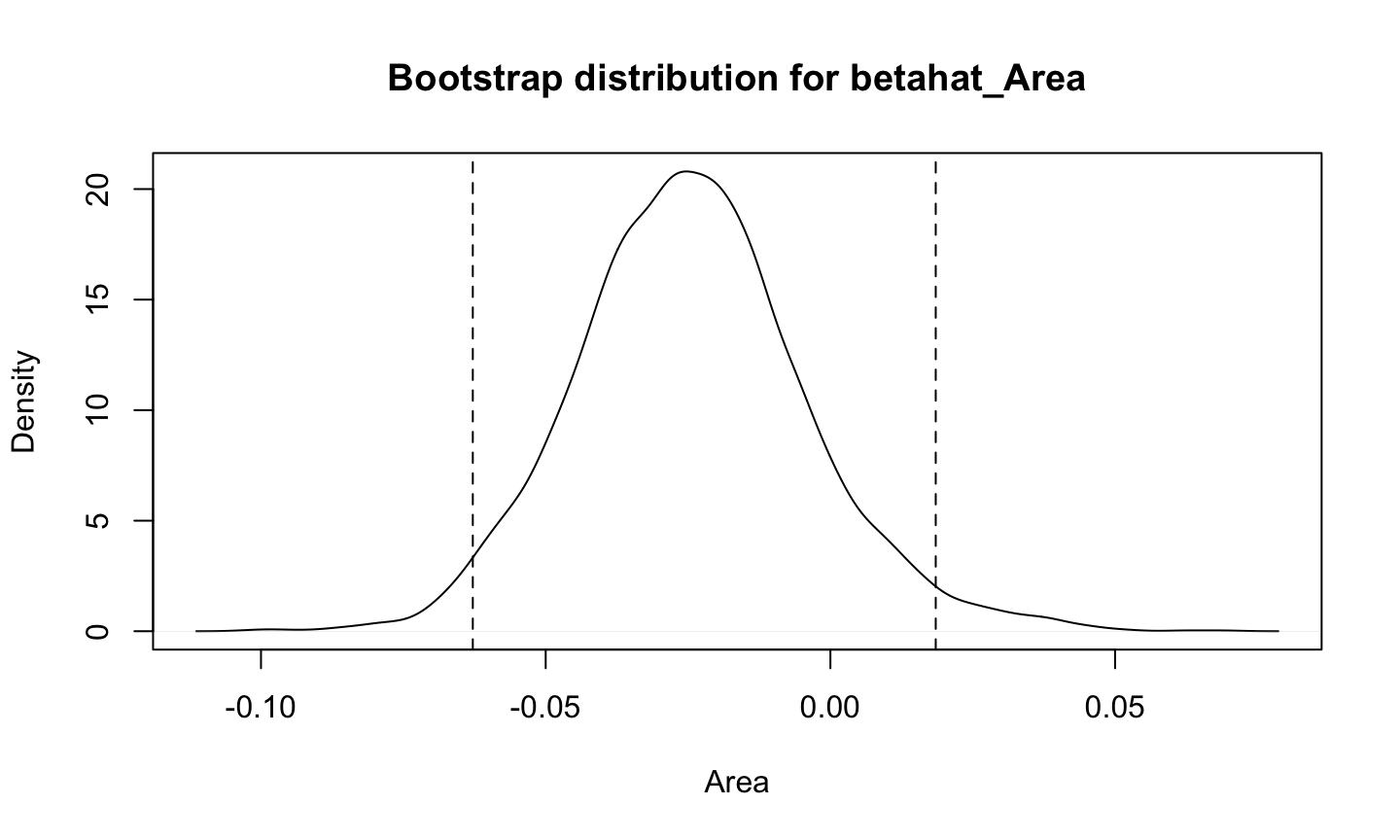
Consider the bootstrap densities for Area and Adjacent along with the associated 95% bootstrap confidence intervals.

Bootstrap Density for Area

plot(density(coefmat$Area), xlab = "Area", main = "") # plot density
title("Bootstrap distribution for betahat_Area") #title
abline(v = c(-.0628, .0185), lty = 2) # plot ci

Bootstrap Density for Adjacent

plot(density(coefmat$Adjacent), xlab = "Adjacent", main = "") # plot density
title("Bootstrap distribution for betahat_Adjacent") #title
abline(v = c(-.104, -.041), lty = 2) # plot ci

Notes

Both densities are roughly symmetric and normal, though this is not always the case.

Bootstrap methods can be used for hypothesis testing, but permutation-based methods are generally preferred.

There are alternative resampling methods for the bootstrap.

  • E.g., we can resample the \((X,Y)\) pairs rather than the residuals.
  • This is less attractive, particularly when X is regarded as fixed, like in designed experiments.

There are also more complex ways of constructing the intervals.

  • See Bootstrap Methods And Their Application by Davison (1997) for more details.

Sampling, Experimentation, Generalization, and Causation

Experimental

The method of data collection determines the conclusions we can draw.

The mathematical model \(Y=X\beta+ϵ\) describes how the response \(Y\) is generated.

For designed experiments, we can view nature as the computer generating our observed responses.

  • We decide the values of the predictors and then record the response \(Y\).
  • We can do this as many times as we want in order to learn something about \(\beta\).

Observational

In observational studies, we have a finite population from which we draw a sample that is our data.

  • We hope to learn about the unknown population value β from the sample.
  • A random sample is needed to do this.
  • The sample should also be a small portion of the total population size (otherwise we need a correction).
  • Samples chosen by hand are typically not very useful.
  • Statistical inference relies on the data selected being a random sample.
  • Even when the data are chosen to be “representative”, the conclusions are suspect.
  • Conclusions drawn from a sample of convenience are easy to criticize, likely to be biased, etc.
  • The conclusions are limited to the sample themselves.

Sample from Entire Population

Sometimes the sample is the entire population.

  • Some might argue that inference is not needed since the sample is the population.
  • Your results are still subject to uncertainty because you can’t measure everything!
  • You need to carefully think about the goals of your model.
  • In this case, permutation tests make it possible to give meaning to the p-value, though the conclusion applies only to the sample.

Two Types of Predictors

There are two basic types of predictors that can be used in regression analysis: experimental and observational.

  • Experimental predictors are controlled by the experimenter.

  • Observational predictors are observed rather than chosen.

The types of predictors can be mixed in a particular study.

Observational Data

For observational data, the idea of holding regressors constant makes no sense:

  • These observable values are not under our control.

  • We cannot change them except by some fantastic feat of civil or genetic engineering, post-apocalyptic mind control, etc.

  • There are probably additional unmeasured variables that have some connection to the response. We cannot possibly hold these constant.

  • A lurking variable is a predictor variable not included in the regression model that would change the interpretation of the fitted model if included.

  • Causal conclusions CANNOT be made for observational data because of the possible existence of lurking variables in our model.

  • Observational data allow us to show an association between two or more variables, but we cannot make causal conclusions.

Causal Conclusion

Causal conclusions CAN be made for data obtained from a randomized experiment (i.e., the treatments are randomly assigned to the subjects).

  • Randomly assigning experimental factors limits the potential effects of lurking variables, since the random assignment guarantees that the correlation between the regressors in the mean function and any lurking variable is small or 0.

  • Some experimental designs are constructed so that the effects of observational factors can be ignored or used in an analysis of covariance.

Two Additional Notes

Conclusions can be generalized from the sample to the population when the subjects were obtained using a random sample of the population.

The interpretation of results from a regression analysis depends on the details of the data design and collection.

Example: Feedlots

A feedlot is a small farming operation that includes many cattle, swine, or poultry in a small area. These operations can provide high-paying jobs while efficiently producing animal products, but can have negative environmental impacts.

A study investigating the effect of feedlots on property values utilized data from 292 residential property sales in two southern Minnesota counties in 1993-1994.

Variables in the Study

  • The response was logarithm of sale price.
  • Some predictors were derived from house characteristics (size, number of bedrooms, age, etc.)
  • Other predictors described the relationship of the property to existing feedlots and related features of the feedlots such as their size.
  • The goal of the regression analysis was to identify the “feedlot effect” from the coefficients of the regressors created from the feedlot variables.

Analysis

The estimated effects were generally positive and judged to be nonzero, meaning that close proximity to feedlots was associated with an increase in sales prices.

  • This was unexpected, but could be positive since the positive economic impact of the feedlot might outweigh the negative environmental considerations.

Can we conclude that living near a feedlot causes an increase in sale price?

.

Can we generalize these results to other places?

Summary

  • Causal conclusions can only be made for data obtained from an experiment in which the treatments were randomly assigned.
  • Results can be generalized to a population when the data are a random sample from that population.

Additional Example of Nested-model F tests

Testing a subspace

Some tests cannot be simply expressed in terms of the inclusion or exclusion of subsets of regressors. E.g., could the areas of the current and adjacent island be added together and be added to our model instead of the two separate regressors?

This can be expressed as:

\(H_0:\beta_{Area}=\beta_{Adjacent} |\beta_{Elevation},\beta_{Nearest},\beta_{Scruz}\neq 0\)

The null model is a linear subspace of the full model and we can test our hypothesis using the general F test.

Galapagos Example

Test whether both the Area and Adjacent regressor variables have identical regression coefficients (assuming the other regressors are in the model).

lmods <- lm(Species ~ I(Adjacent + Area) + Elevation + Nearest + Scruz, gala) 
lmod = lm(Species ~ Area + Elevation + Nearest + Scruz + Adjacent, data = gala)
anova(lmod,lmods)
## Analysis of Variance Table
## 
## Model 1: Species ~ Area + Elevation + Nearest + Scruz + Adjacent
## Model 2: Species ~ I(Adjacent + Area) + Elevation + Nearest + Scruz
##   Res.Df    RSS Df Sum of Sq     F  Pr(>F)  
## 1     24  89231                             
## 2     25 109591 -1    -20360 5.476 0.02793 *
## ---
## Signif. codes:  0 '***' 0.001 '**' 0.01 '*' 0.05 '.' 0.1 ' ' 1

Test \(\beta = c\)

If we wanted to test whether a certain regression coefficient equaled a value, then this can also be done.

Suppose we wish to test \(H_0:\beta_i=c\) versus \(H_a:\beta_i\neq c\) for some constant \(c\). This can also be done using the general F test previously discussed.

In this case, our null model becomes

\[y=\beta_0+\beta_1 X_1+\dots +cX_i+\dots+\epsilon.\]

The trick is fitting the appropriate model in R.

Galapagos Example

Test whether \(\beta_{Elevation}=0.5\) assuming the other regressors are in the model.

lmod = lm(Species ~ Area + Elevation + Nearest + Scruz + Adjacent, data = gala)
lmods <- lm(Species ~ Area + offset(0.5*Elevation) + Nearest + Scruz + Adjacent, gala) 
# the offset term indicates that this term is a constant and not to be estimated.
anova(lmods, lmod) # compare models using general f-test
## Analysis of Variance Table
## 
## Model 1: Species ~ Area + offset(0.5 * Elevation) + Nearest + Scruz + 
##     Adjacent
## Model 2: Species ~ Area + Elevation + Nearest + Scruz + Adjacent
##   Res.Df    RSS Df Sum of Sq      F   Pr(>F)   
## 1     25 131312                                
## 2     24  89231  1     42081 11.318 0.002574 **
## ---
## Signif. codes:  0 '***' 0.001 '**' 0.01 '*' 0.05 '.' 0.1 ' ' 1

Using t-test

The previous test could be done using a t test. In that case:

\(H_0:\beta_i=c\)

\(H_a: \begin{cases}\beta_i=c & (two-tailed)\\ \beta_i>c & (upper-tailed) \\ \beta_i<c &(lower-tailed) \end{cases}\)

Test Statistic:

\[t = \frac{\hat{\beta}_i-c}{\hat{se}(\hat{\beta}_i)}\]

has a \(t\) distribution with \(n-p\) degrees of freedom

\(P-value: \begin{cases}2P(T_{n-p}>|t|) & (two-tailed)\\ P(T_{n-p}>t) & (upper-tailed) \\ P(T_{n-p}<t)& (lower-tailed)\end{cases}\)

Galapagos Example

Test whether \(\beta_{Elevation}=0.5\) using a \(t\) test (assuming the other regressors are in the model).

\(H_0:\ \beta_{Elevation} = 0.5\)

\(H_a:\ \beta_{Elevation} \neq 0.5\)

(tstat <- (coef(lmod)[3] - 0.5)/sqrt(vcov(lmod)[3,3])) # test statistic
## Elevation 
## -3.364253
2 * (1 - pt(abs(tstat), df = df.residual(lmod))) # p-value
##   Elevation 
## 0.002573836

Notes

The \(t\) test approach is preferred for testing claims about individual regression coefficients since you don’t need to fit multiple models.

  • Results will be the same as if you were using a general F test approach.

Notes:

  • We can only test hypotheses about linear combinations of regression coefficients.
  • E.g., we could test whether β_i=2β_j
  • E.g., we could not test whether β_i β_j=1
  • We can only compare models that are nested.
  • We cannot compare models for different data.
  • This can occur if you have missing data for a certain regressors.